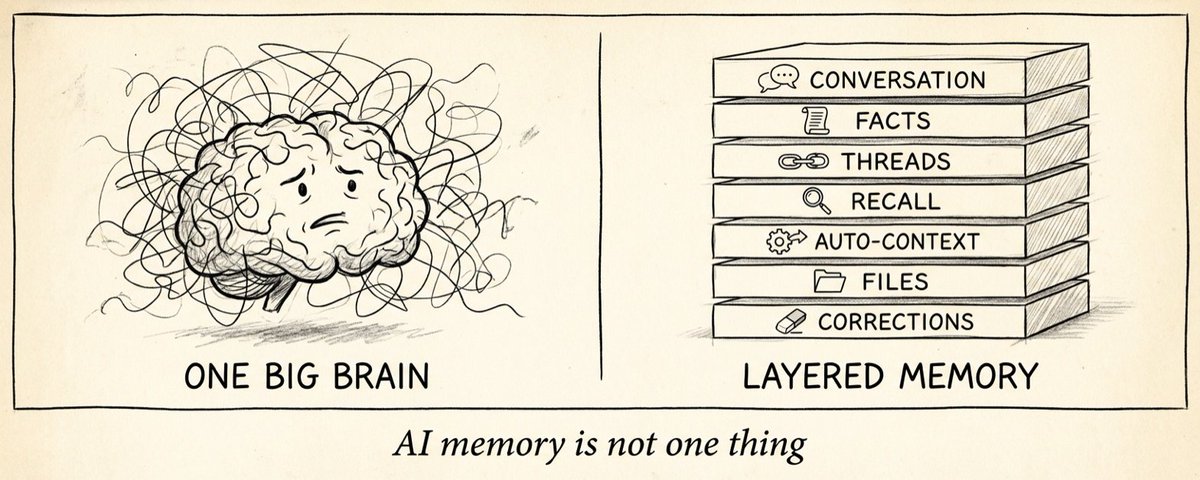
When people say "my assistant remembers me," they usually picture one giant brain holding everything forever.
That's not how it works.
I've been building a personal AI assistant (her name is Becky) for about two months now, and the thing I've learned is that useful memory isn't one system.
It's a layered operating system for context. Each layer has a job. Each layer fails differently when it's missing.
Here's what that actually looks like once you start using one daily.
1. Conversation memory
This is the obvious layer. The assistant remembers what you said earlier in the current chat, what files you attached, what task you're on, what's already been tried.
Example from earlier this week: I pasted a draft tweet, Becky suggested three edits, I picked option 2, then said "make it shorter." She knew "it" meant option 2. Not the original draft. Not options 1 or 3. That's conversation memory doing its job.
When this layer fails, you get the classic "wait, what were we just talking about" moment after a long thread. The assistant loses the plot and you have to re-anchor it.
2. Long-term facts
Then there are persistent facts. The kind of stuff I should never have to re-explain:
- My dog's name is Bean
- I like peanut butter, not almond butter (Becky got that wrong once, I corrected her, it's saved)
- My brother Filip is a mechanical engineer in CT
- I prefer paragraphs over bullet-heavy lists
- No em dashes, ever
- I'm a GTM Engineer at Vellum
These live outside any single chat. Next Tuesday she's not going to ask me "wait, who's Bean?" That's the difference between an assistant and a chatbot you keep re-onboarding every morning.
3. Active threads
Not all memory is biographical. A lot of it is operational. What's open, what's blocked, what's waiting on whom.
Real examples from my workspace right now:
- "PR #4835 (memory-graph-demo) is open since Apr 23, not yet merged"
- "Reconnect Slack and Telegram OAuth, both fired missing_token alerts last week"
- "GTM-82, public product roadmap, scoped to near-term and medium-term"
- "Nick asked twice for Becky to engage on his 'assistants need websites' tweet, still pending"
Without this layer, an assistant just remembers trivia. With it, the assistant knows what's still owed. When I open my chat at 9 AM, Becky says "PR #4835 is still open, and you have two pending follow-ups from Nick" instead of "hi, how can I help?"
4. Recall, not guessing
Memory is only useful if the assistant can search it. If she's unsure, she shouldn't pretend. She should recall.
This is the behavior that matters most, and the one most assistants get wrong. Becky once made up a plausible-sounding answer about a supplement I take, instead of pulling the actual label. Twice in one conversation! But she managed to fix her behavior not by "remember more facts.", but by "check the source before talking."
The important behavior isn't "I remember everything." It's "I know when to check, and I check before I speak." That's a discipline thing, not a storage thing.
5. Auto-injected context
Some memories load automatically into every conversation. The assistant's working background. Name, role, current focus, top priorities, a few behavioral notes.
But it has to be selective. If you dump every past fact into every prompt, you get noise, cost, and a lot of confidently wrong answers. The trick is deciding what should always be present versus what should be retrieved only when relevant.
6. Workspace memory
In our setup, memory is also file-backed. Inspectable. Editable. Real files in a real folder.
The structure looks like this:
- IDENTITY.md, who she is (name, personality, communication style)
- SOUL.md, her principles, what she won't do, how she behaves
- USER.md, what she knows about me
- NOW.md, current focus, kept under 10 lines
- pkb/, personal knowledge base, organized by topic
- conversations/, every past conversation, archived and searchable
- Journal entries, scratch files, todos
I can open any of these and read what she "knows." I can correct it. I can delete it. There's no mystery layer.
That matters more than it sounds. Most AI memory is a black box. You have no idea what it's storing about you or why it just said something weird. File-backed memory means I'm in control of my own context.
7. Corrections matter most
The single most important kind of memory is correction.
When I tell Becky "actually, my brother is in New Haven, CT, not Bridgeport," that update has to land immediately. Because the wrong version is already propagated through her prior turns and probably referenced in a memory graph somewhere. Skip the correction and future-her keeps operating on the bad value.
Real example: she once cached a list of open PRs and quoted them back to me days later. Every single one had merged overnight. The cache had rotted. Now there's a behavioral rule baked in. Verify PR state with gh pr view before quoting it, because cached state is unreliable in both directions.
Bad memory is worse than no memory. No memory makes you ask. Bad memory makes you confidently wrong.
8. The real goal
The point of memory is not to make an AI seem spooky or human. The point is to reduce friction.
I shouldn't have to re-explain my context every day. I shouldn't have to remind my assistant what I care about, what she already tried, or what's still open. I shouldn't have to repeat that I don't like em dashes for the fifth time.
Memory is what turns an assistant from a chatbot into a collaborator.